The Inventory Management System is developed using Python. The project is built to manage sales and transactions. To make a new transaction, fields such as: chicken type , qty needs to be selected. If you like to learn point of sales systems step by step, this is the right place to learn from the beginning. In this tutorial useful for making a point of sales system for a small shops.
In order to make this system i used pycharm editor. if you want to download the pycharm editor click this link
Here
Inventory Management System using Python
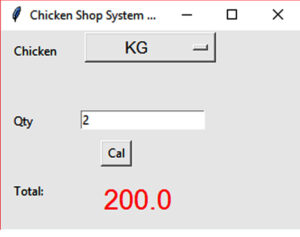
In the above Example
- The user shall be able to select the option KG or GR as their wish.
- The user shall be able to enter the qty what they need. Click Cal button total as calculated.
I attached the code the below. How the user interface look like and how the calculation will be working.
import tkinter as tk

OptionList1 = [
"KG",
"GR",

]

def Ok():

    chicken = variable.get()


    amount = float(e1.get())

    if (chicken == "KG" ):

        tot = amount * 100

    else:
        tot = amount/1000 * 100

    nsalText.set(tot)

root = tk.Tk()
root.geometry('300x200')
root.title("Chicken Shop System Python")

variable = tk.StringVar(root)
variable.set(OptionList1[0])

opt = tk.OptionMenu(root, variable, *OptionList1)
variable1 = tk.StringVar(root)
opt.config(width=10, font=('Helvetica', 12))
opt.pack(side="top")

global e1
global nsalText
nsalText = tk.StringVar()
labelTest = tk.Label(text="", font=('Helvetica', 12), fg='red')
labelTest.pack(side="top")


tk.Label(root, text="Chicken ").place(x=10, y=10)

tk.Label(root, text="Qty").place(x=10, y=80)

tk.Label(root, text="Total:").place(x=10, y=150)
tk.Label(root, text="", font=('Helvetica', 20), fg='red' , textvariable=nsalText).place(x=100, y=150)
tk.Button(root, text="Cal", command=Ok ,height = 1, width = 3).place(x=100, y=110)

e1 = tk.Entry(root)
e1.place(x=80, y=80,)

root.mainloop()