This tutorial will teach Inventory Management Sales Part step by step.i already complete the part of category and brand and product and user login. this will cover about the sales part of Inventory Management
Sales
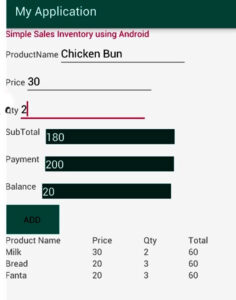
The app shall be able search the product name,price by the relavent barcode id.after got the product name,price where the user has the option to add the qty by click the add button to see all Products details which will be shown in the below table.after calculating the total on total textbox.
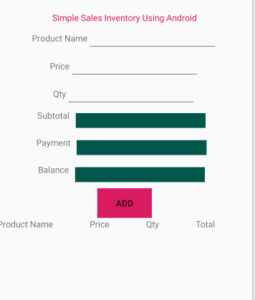
UI Design Of the App
activity_main.xml
<?xml version="1.0" encoding="utf-8"?>
<LinearLayout xmlns:android="http://schemas.android.com/apk/res/android"
    xmlns:app="http://schemas.android.com/apk/res-auto"
    xmlns:tools="http://schemas.android.com/tools"
    android:layout_width="match_parent"
    android:layout_height="match_parent"
    android:orientation="vertical"
    android:gravity="center"
    tools:context=".MainActivity">


   <LinearLayout
       android:layout_width="wrap_content"
       android:layout_height="wrap_content"
       android:orientation="horizontal"
       >

       <TextView
           android:layout_width="wrap_content"
           android:layout_height="wrap_content"
           android:text="Simple Sales Inventory Using Android"
           android:textColor="@color/colorAccent"
           android:gravity="center" />

   </LinearLayout>


    <LinearLayout
        android:layout_width="wrap_content"
        android:layout_height="wrap_content"
        android:orientation="horizontal">
        <TextView
            android:layout_width="wrap_content"
            android:layout_height="wrap_content"
            android:text="Product Name" />
        <EditText
            android:layout_width="wrap_content"
            android:layout_height="wrap_content"
            android:id="@+id/ed1"
            android:ems="10" />
    </LinearLayout>

    <LinearLayout
        android:layout_width="wrap_content"
        android:layout_height="wrap_content"
        android:orientation="horizontal">
        <TextView
            android:layout_width="wrap_content"
            android:layout_height="wrap_content"
            android:text="Price" />
        <EditText
            android:layout_width="wrap_content"
            android:layout_height="wrap_content"
            android:id="@+id/ed2"
            android:ems="10" />
    </LinearLayout>

    <LinearLayout
        android:layout_width="wrap_content"
        android:layout_height="wrap_content"
        android:orientation="horizontal">
        <TextView
            android:layout_width="wrap_content"
            android:layout_height="wrap_content"
            android:text="Qty" />
        <EditText
            android:layout_width="wrap_content"
            android:layout_height="wrap_content"
            android:id="@+id/ed3"
            android:ems="10" />
    </LinearLayout>


    <LinearLayout
        android:layout_width="wrap_content"
        android:layout_height="wrap_content"
        android:orientation="horizontal">
        <TextView
            android:layout_width="wrap_content"
            android:layout_height="wrap_content"
            android:text="Subtotal" />
        <EditText
            android:layout_width="wrap_content"
            android:layout_height="wrap_content"
            android:layout_margin="10sp"
            android:background="@color/colorPrimaryDark"
            android:id="@+id/txtsub"
            android:textColor="#fff"
            android:enabled="false"
            android:ems="10" />
    </LinearLayout>


    <LinearLayout
        android:layout_width="wrap_content"
        android:layout_height="wrap_content"
        android:orientation="horizontal">
        <TextView
            android:layout_width="wrap_content"
            android:layout_height="wrap_content"
            android:text="Payment" />
        <EditText
            android:layout_width="wrap_content"
            android:layout_height="wrap_content"
            android:layout_margin="10sp"
            android:background="@color/colorPrimaryDark"
            android:id="@+id/txtpay"
            android:textColor="#fff"

            android:ems="10" />
    </LinearLayout>


    <LinearLayout
        android:layout_width="wrap_content"
        android:layout_height="wrap_content"
        android:orientation="horizontal">
        <TextView
            android:layout_width="wrap_content"
            android:layout_height="wrap_content"
            android:text="Balance" />
        <EditText
            android:layout_width="wrap_content"
            android:layout_height="wrap_content"
            android:layout_margin="10sp"
            android:background="@color/colorPrimaryDark"
            android:id="@+id/txtbal"
           android:textColor="#fff"
            android:enabled="false"
            android:ems="10" />
    </LinearLayout>


    <LinearLayout
        android:layout_width="wrap_content"
        android:layout_height="wrap_content"
        android:orientation="horizontal">
        <Button
            android:layout_width="wrap_content"
            android:layout_height="wrap_content"
            android:id="@+id/btn1"
            android:text="Add"
            android:background="@color/colorAccent"

            />
    </LinearLayout>


    <LinearLayout
        android:layout_width="wrap_content"
        android:layout_height="wrap_content"
        android:orientation="vertical">

        <TableLayout
            android:layout_width="match_parent"
            android:layout_height="360dp"
            android:id="@+id/tb1"
            android:stretchColumns="*">


           <TableRow android:layout_width="match_parent"
               android:layout_height="wrap_content"
               android:id="@+id/tbrow1">

               <TextView
                   android:id="@+id/t1"
                   android:layout_width="wrap_content"
                   android:layout_height="wrap_content"
                   android:text="Product Name"
                   />

               <TextView
                   android:id="@+id/t2"
                   android:layout_width="wrap_content"
                   android:layout_height="wrap_content"
                   android:text="Price"
                   />

               <TextView
                   android:id="@+id/t3"
                   android:layout_width="wrap_content"
                   android:layout_height="wrap_content"
                   android:text="Qty"
                   />

               <TextView
                   android:id="@+id/t4"
                   android:layout_width="wrap_content"
                   android:layout_height="wrap_content"
                   android:text="Total"
                   />

           </TableRow>


        </TableLayout>

    </LinearLayout>

</LinearLayout>
MainActivity.java
package com.example.kobinath.simpleinventroy;

import android.support.v7.app.AppCompatActivity;
import android.os.Bundle;
import android.text.Editable;
import android.text.TextWatcher;
import android.view.View;
import android.widget.Button;
import android.widget.EditText;
import android.widget.TableLayout;
import android.widget.TableRow;
import android.widget.TextView;

import java.util.ArrayList;

public class MainActivity extends AppCompatActivity {


    private ArrayList<String> data = new ArrayList<String>();
    private ArrayList<String> data1 = new ArrayList<String>();
    private ArrayList<String> data2 = new ArrayList<String>();
    private ArrayList<String> data3 = new ArrayList<String>();

    private TableLayout table;

    EditText ed1,ed2,ed3,ed4,ed5,ed6;
    Button b1;

    @Override
    protected void onCreate(Bundle savedInstanceState) {
        super.onCreate(savedInstanceState);
        setContentView(R.layout.activity_main);

        ed1 = findViewById(R.id.ed1);
        ed2 = findViewById(R.id.ed2);
        ed3 = findViewById(R.id.ed3);

        ed4 = findViewById(R.id.txtsub);
        ed5 = findViewById(R.id.txtpay);
        ed6= findViewById(R.id.txtbal);

        b1 = findViewById(R.id.btn1);


        ed5.addTextChangedListener(new TextWatcher() {
            @Override
            public void beforeTextChanged(CharSequence s, int start, int count, int after) {

            }

            @Override
            public void onTextChanged(CharSequence s, int start, int before, int count) {

                int subtotal = Integer.parseInt(ed4.getText().toString());
                int pay = Integer.parseInt(ed5.getText().toString());
                int bal = pay - subtotal;
                ed6.setText(String.valueOf(bal));
            }

            @Override
            public void afterTextChanged(Editable s) {


            }
        });


        b1.setOnClickListener(new View.OnClickListener() {
            @Override
            public void onClick(View v) {
                add();
            }
        });


    }


    public void add()

    {
        int tot;

        String prodname = ed1.getText().toString();
        int price = Integer.parseInt(ed2.getText().toString());
        int qty = Integer.parseInt(ed3.getText().toString());
        tot = price * qty;

        data.add(prodname);
        data1.add(String.valueOf(price));
        data2.add(String.valueOf(qty));
        data3.add(String.valueOf(tot));

        TableLayout table = (TableLayout) findViewById(R.id.tb1);

        TableRow row = new TableRow(this);
        TextView t1 = new TextView(this);
        TextView t2 = new TextView(this);
        TextView t3 = new TextView(this);
        TextView t4 = new TextView(this);

        String total;

        int sum = 0;

        for(int i = 0; i< data.size(); i ++)
        {

            String pname = data.get(i);
            String prc = data1.get(i);
            String qtyy = data2.get(i);
            total = data3.get(i);

            t1.setText(pname);
            t2.setText(prc);
            t3.setText(qtyy);
            t4.setText(total);

            sum = sum + Integer.parseInt(data3.get(i).toString());
        }

        row.addView(t1);
        row.addView(t2);
        row.addView(t3);
        row.addView(t4);
        table.addView(row);


        ed4.setText(String.valueOf(sum));
        ed1.setText("");
        ed2.setText("");
        ed3.setText("");
        ed1.requestFocus();

    }


}
[adToAppearHere]
i have attached the video link below. which will do this tutorials step by step.