This tutorial will teach you how to make simple Payroll System using Java and Mysql. we will be teach step by step.if you like to learn java projects this is right place to learn.
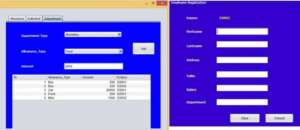
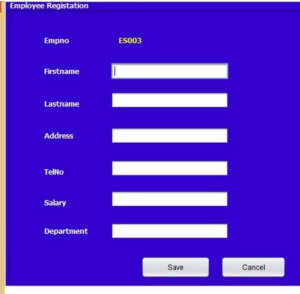
First we have to make a Simple Employee Registation form with auto generated Id
public void autoId()
    {
        try {
             Class.forName("com.mysql.jdbc.Driver");
                   con = DriverManager.getConnection("jdbc:mysql://localhost/spay","root","");
            Statement s = con.createStatement();
            ResultSet rs = s.executeQuery("SELECT MAX(empno) FROM employee");
            rs.next();
            rs.getString("MAX(empno)");
            if (rs.getString("MAX(empno)") == null) {
                txtempno.setText("ES001");
            } else {
                long id = Long.parseLong(rs.getString("MAX(empno)").substring(2, rs.getString("MAX(empno)").length()));
                id++;
                txtempno.setText("ES" + String.format("%03d", id));
            }
        } catch (Exception ex) {
            ex.printStackTrace();
        }
    }
Call this method inside the constructor of the class
public employee() {
        initComponents();
        autoId();
    }
Following code which use to add the employee records in to the database.
String empno = txtempno.getText();
         String firstname = txtfname.getText();
         String lastname = txtlname.getText();
         String address = txtaddress.getText();
         String tel = txttel.getText();
         String sal = txtsal.getText();
         String depart = txtdepart.getText();
        try {
            Class.forName("com.mysql.jdbc.Driver");
            con = DriverManager.getConnection("jdbc:mysql://localhost/spay","root","");
            pst = con.prepareStatement("insert into employee(empno,firstname,lastname,address,telno,salary,depart)values(?,?,?,?,?,?,?)");
            pst.setString(1, empno);
            pst.setString(2, firstname);
            pst.setString(3, lastname);
            pst.setString(4, address);
            pst.setString(5, tel);
            pst.setString(6, sal);
            pst.setString(7, depart);
            pst.executeUpdate();
            JOptionPane.showMessageDialog(null,"Employeee Insertedddddd");
        }
         catch (ClassNotFoundException ex)
        {
            ex.printStackTrace();
        } catch (SQLException ex)
        {
            ex.printStackTrace();
        }
    }