This tutorial will teach you to make a small Fish shop Inventory system using python. The following system will use to manage the Fish shop.
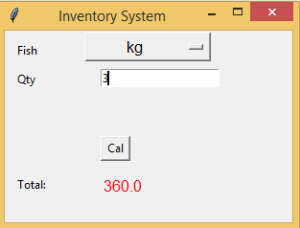
import tkinter as tk

OptionList = [
"kg",
"gm",
]

def Ok():
    item = variable.get()
    result = float(e1.get())

    if item == "kg":
        tot = result * 120
    else :
        tot = result/1000 * 120
    nsalText.set(tot)

root = tk.Tk()
root.geometry('300x200')
root.title("Inventory System")

variable = tk.StringVar(root)
variable.set(OptionList[0])

opt = tk.OptionMenu(root, variable, *OptionList)
opt.config(width=10, font=('Helvetica', 12))
opt.pack(side="top")
global e1
global nsalText
nsalText = tk.StringVar()
labelTest = tk.Label(text="", font=('Helvetica', 12), fg='red')
labelTest.pack(side="top")

tk.Label(root, text="Fish").place(x=10, y=10)

tk.Label(root, text="Qty").place(x=10, y=40)


tk.Label(root, text="Total:").place(x=10, y=150)
tk.Label(root, text="", font=('Helvetica', 12), fg='red' , textvariable=nsalText).place(x=100, y=150)
tk.Button(root, text="Cal", command=Ok ,height = 1, width = 3).place(x=100, y=110)

e1 = tk.Entry(root)
e1.place(x=100, y=40)

root.mainloop()
i have attached the video link below. which will do this tutorials step by step.