In this tutorial we are going to teach Form Repeater using HTML CSS JQuery.step by step.this is very importent when you have the inventory managment system and stock managment system projects
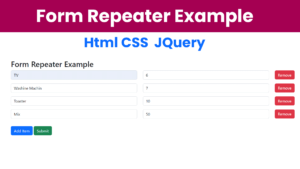
Html
<!DOCTYPE html>
<html lang="en">
<head>
    <meta charset="UTF-8">
    <meta name="viewport" content="width=device-width, initial-scale=1.0">
    <title>Form Repeater</title>
    <link rel="stylesheet" href="https://stackpath.bootstrapcdn.com/bootstrap/4.5.2/css/bootstrap.min.css">

    <link href="https://cdn.jsdelivr.net/npm/bootstrap@5.2.3/dist/css/bootstrap.min.css" rel="stylesheet" integrity="sha384-rbsA2VBKQhggwzxH7pPCaAqO46MgnOM80zW1RWuH61DGLwZJEdK2Kadq2F9CUG65" crossorigin="anonymous">

</head>
<body>
    <div class="container mt-5">
        <h2>Form Repeater Example</h2>
        <form id="repeaterForm">
            <div id="repeaterContainer">
                <div class="form-group repeater-item">
                    <div class="row">
                        <div class="col-md-5">
                            <input type="text" name="name[]" class="form-control" placeholder="Product Name">
                        </div>
                        <div class="col-md-5">
                            <input type="number" name="qty[]" class="form-control" placeholder="Qty">
                        </div>
                        <div class="col-md-2">
                            <button type="button" class="btn btn-danger remove-item">Remove</button>
                        </div>
                    </div>
                </div>
            </div>
            <button type="button" id="addItem" class="btn btn-primary mt-3">Add Item</button>
            <button type="submit" class="btn btn-success mt-3">Submit</button>
        </form>
    </div>

    <script src="https://code.jquery.com/jquery-3.5.1.min.js"></script>
    <script src="https://stackpath.bootstrapcdn.com/bootstrap/4.5.2/js/bootstrap.min.js"></script>
    <script src="script/form-repeater.js"></script>
</body>
</html>
Query
$(document).ready(function() {
    // Add new item
    $('#addItem').click(function() {
        var newItem = `
            <div class="form-group repeater-item">
                <div class="row">
                    <div class="col-md-5">
                        <input type="text" name="name[]" class="form-control" placeholder="Name">
                    </div>
                    <div class="col-md-5">
                        <input type="number" name="qty[]" class="form-control" placeholder="Qty">
                    </div>
                    <div class="col-md-2">
                        <button type="button" class="btn btn-danger remove-item">Remove</button>
                    </div>
                </div>
            </div>
        `;
        $('#repeaterContainer').append(newItem);
    });

    // Remove item
    $(document).on('click', '.remove-item', function() {
        $(this).closest('.repeater-item').remove();
    });

    // Form submission
    $('#repeaterForm').submit(function(event) {
        event.preventDefault();
        var formData = $(this).serialize();
        console.log('Form Data:', formData);

    });
});
I attached the video below How to make this System