In this tutorials will teach How to do the student mark calculation in Angular.
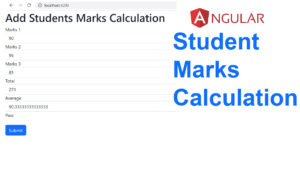
First you have to add the FormsModule inside the imports.
Create the new Components studentmarks
studentmarks.component.html
<form>

    <h1>Add Students Marks Calculation</h1>

<div>
  <label >Marks 1</label>
  <input type = "text"  name="num1" [(ngModel)] = "marks1" class="form-control"  placeholder="Enter Num 1">

</div>

  <div>
    <label >Marks 2</label>
    <input type = "text"  name="num2"  [(ngModel)] = "marks2" class="form-control"  placeholder="Enter Num 2">

  </div>

  <div>
    <label >Marks 3</label>
    <input type = "text"  name="num2"  [(ngModel)] = "marks3" class="form-control"  placeholder="Enter Num 2">

  </div>


  <div >
    <label >Total</label>
    <input  class="form-control"  placeholder="Total" value="{{ result }}">
  </div>

  <div >
    <label >Average</label>
    <input  class="form-control"  placeholder="Total" value="{{ avg }}">
  </div>

  <div *ngIf="avg > 50; else grade">
    Pass
  </div>

  <ng-template #grade>
    Fail
  </ng-template>


<button  (click)="StudentTot()" class="btn btn-primary mt-4">Submit</button>

</form>
studentmarks.component.ts
marks1:string = ”;
marks2:string = ”;
marks3:string = ”;
result:number=0;
avg:number=0.0;
StudentTot()
{
this.result = parseInt(this.marks1) + parseInt(this.marks2) + parseInt(this.marks3);
this.avg = (this.result) / 3 ;
}
import { Component, OnInit } from '@angular/core';

@Component({
  selector: 'app-studentmarks',
  templateUrl: './studentmarks.component.html',
  styleUrls: ['./studentmarks.component.scss']
})
export class StudentmarksComponent implements OnInit {

  marks1:string = '';
  marks2:string = '';
  marks3:string = '';
  result:number=0;
  avg:number=0.0;


StudentTot()
{
  this.result = parseInt(this.marks1) + parseInt(this.marks2) + parseInt(this.marks3);
  this.avg = (this.result) / 3 ;

}

  constructor() { }

  ngOnInit(): void {
  }


}
i have attached the video link below. which will do this tutorials step by step