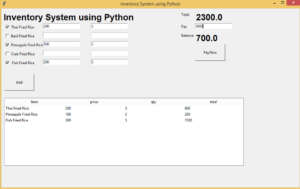
The inventory management is developed by python tkinter. The project is built to manage items and transactions. To make a new transaction, fields such as: Fried rice name, qty and payment needs to be selected. If you like to learn point of sales systems step by step, this is the right place to learn from the beginning.
from tkinter import *
from tkinter import ttk

def pay():
    totall = float(tot.cget("text"))
    pay = float(e11.get())
    bal = pay - totall
    balText.set(bal)

def show():

    tot = 0
    if(var1.get()):
      price = int(e1.get())
      qty = int(e6.get())
      tot = int(price * qty)
      tempList = [['Thai Fried Rice', e1.get(), e6.get(), tot]]
      tempList.sort(key=lambda e: e[1], reverse=True)
      for i, (item, price, qty, tot) in enumerate(tempList,start=1):
       listBox.insert("", "end", values=(item, price, qty, tot))

    if (var2.get()):
        price = int(e2.get())
        qty = int(e7.get())
        tot = int(price * qty)
        tempList = [['Basil Fried Rice', e2.get(), e7.get(), tot]]
        tempList.sort(key=lambda e: e[1], reverse=True)
        for i, (item, price, qty, tot) in enumerate(tempList, start=1):
            listBox.insert("", "end", values=(item, price, qty, tot))

    if (var3.get()):
        price = int(e3.get())
        qty = int(e8.get())
        tot = int(price * qty)
        tempList = [['Pineapple Fried Rice', e3.get(), e8.get(), tot]]
        tempList.sort(key=lambda e: e[1], reverse=True)
        for i, (item, price, qty, tot) in enumerate(tempList, start=1):
            listBox.insert("", "end", values=(item, price, qty, tot))

    if (var4.get()):
        price = int(e4.get())
        qty = int(e9.get())
        tot = int(price * qty)
        tempList = [['Crab Fried Rice', e4.get(), e9.get(), tot]]
        tempList.sort(key=lambda e: e[1], reverse=True)

        for i, (item, price, qty, tot) in enumerate(tempList, start=1):
            listBox.insert("", "end", values=(item, price, qty, tot))

    if (var5.get()):
        price = int(e5.get())
        qty = int(e10.get())
        tot = int(price * qty)
        tempList = [['Fish Fried Rice', e5.get(), e10.get(), tot]]
        tempList.sort(key=lambda e: e[1], reverse=True)
        for i, (item, price, qty, tot) in enumerate(tempList, start=1):
            listBox.insert("", "end", values=(item, price, qty, tot))

    sum1 = 0.0
    for child in listBox.get_children():
        sum1 += float(listBox.item(child, 'values')[3])
    totText.set(sum1)

root = Tk()
root.title("Inventory System using Python")
root.geometry("1000x600")
global e1
global e2
global e3
global e4
global totText
global balText

totText = StringVar()
balText = IntVar()

Label(root, text="Inventory System using Python",font="arial 22 bold").place(x=5, y=10)

var1 = IntVar()
Checkbutton(root, text="Thai Fried Rice", variable=var1).place(x=10, y=50)

var2 = IntVar()
Checkbutton(root, text="Basil Fried Rice", variable=var2).place(x=10, y=80)

var3 = IntVar()
Checkbutton(root, text="Pineapple Fried Rice", variable=var3).place(x=10, y=110)

var4 = IntVar()
Checkbutton(root, text="Crab Fried Rice", variable=var4).place(x=10, y=140)

var5 = IntVar()
Checkbutton(root, text=" Fish Fried Rice  ", variable=var5).place(x=10, y=170)
Label(root, text="Total").place(x=600, y=10)

Label(root, text="Pay").place(x=600, y=50)
Label(root, text="Balance").place(x=600, y=80)

e1 = Entry(root)
e1.place(x=140, y=50)

e2 = Entry(root)
e2.place(x=140, y=80)

e3 = Entry(root)
e3.place(x=140, y=110)

e4 = Entry(root)
e4.place(x=140, y=140)

e5 = Entry(root)
e5.place(x=140, y=170)

e6 = Entry(root)
e6.place(x=300, y=50)

e7 = Entry(root)
e7.place(x=300, y=80)

e8 = Entry(root)
e8.place(x=300, y=110)

e9 = Entry(root)
e9.place(x=300, y=140)

e10 = Entry(root)
e10.place(x=300, y=170)


tot = Label(root, text="",font="arial 22 bold", textvariable=totText)
tot.place(x=650, y=10)


e11 = Entry(root)
e11.place(x=650, y=50)

e12 = Entry(root)

balance = Label(root, text="",font="arial 22 bold", textvariable=balText).place(x=650, y=80)
Button(root, text="Add",command = show,height=3, width= 13).place(x=10, y=220)
Button(root, text="PayNow",command = pay,height=3, width= 13).place(x=650, y=120)

cols = ('item', 'price', 'qty','total')
listBox = ttk.Treeview(root, columns=cols, show='headings')

for col in cols:
    listBox.heading(col, text=col)
    listBox.grid(row=1, column=0, columnspan=2)
    listBox.place(x=10, y=300)

root.mainloop()