In this tutorial will teach jdbc record insertion into mysql database step by step.
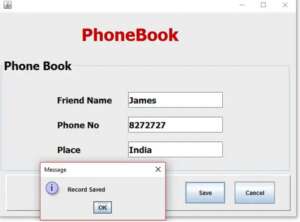
First Step
Establish the database Connection
Connection con;
    PreparedStatement pst;

     public void Connect()
    {
        try {
            Class.forName("com.mysql.jdbc.Driver"); //Register the mysql driver
            con = DriverManager.getConnection("jdbc:mysql://localhost/phonebook","root","");
        } catch (ClassNotFoundException ex) {
           ex.printStackTrace();
        } catch (SQLException ex) {
            ex.printStackTrace();
        }
    }
Put the code inside the Save Button
try
       {
            String friendname,phone,place;
            friendname = txtFname.getText();
            phone = txtphone.getText();
            place = txtplace.getText();
            pst = con.prepareStatement("insert into records(fname,phone,place)values(?,?,?)");
            pst.setString(1,friendname);
            pst.setString(2,phone);
            pst.setString(3,place);
            int status =  pst.executeUpdate();

            if(status==1)
            {
              JOptionPane.showMessageDialog(this, "Record Saved");
                txtFname.setText("");
                txtphone.setText("");
                txtplace.setText("");
                txtFname.requestFocus();
            }
            else
            {
                 JOptionPane.showMessageDialog(this, "Record Failed");
            }
        } catch (SQLException ex) {
            ex.printStackTrace();
        }
i have attached the video link below. which will do this tutorials step by step.