Up next in 10


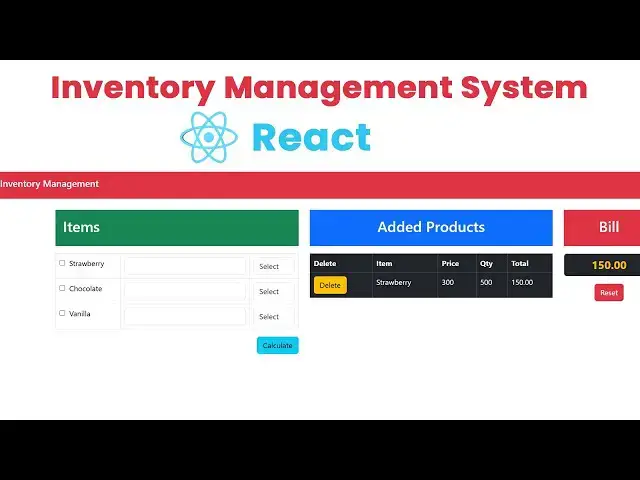
Inventory Management System Using React
Source code : https://www.tutussfunny.com/react-inventory-management-system-project/
#react#reactinvnetorymanagement
Show More Show Less View Video Transcript
0:00
hi friends welcome to T funny Channel
0:02
today I'm going to teach how to make the
0:04
simple inventory management system using
0:06
react so you can see here this is simple
0:09
items this is the add products and Bill
0:12
so if you click the strawberry so this
0:15
is the various categories so various
0:18
part so you you have to calculate the uh
0:22
uh liter this is the milk shop okay this
0:26
is the milk shop you are going to do the
0:28
invent for milk shop so me and you have
0:31
to
0:33
uh you have to order the milk as a
0:36
strawberry which is a liter so I need to
0:39
order 2 lit so the
0:42
chocolate
0:45
milk M 500
0:48
mL okay so so I going click calculated
0:52
here it is a 2 L 600 so the 500 so this
0:57
one 200 250
1:00
so the total will be display over here
1:03
okay very simple if you click reset it
1:04
all the things are reset so if you
1:06
calculate again
1:08
strawberry so you have to calculate at
1:11
uh
1:12
500
1:15
mL and chocolate 1 lit so 2 l 1
1:22
lit click on it it will be display the
1:25
amount okay for it working as for I I
1:30
hope you guys you understood the things
1:31
well if you click delete the items
1:32
should be deleted
1:34
and uh price would be display okay okay
1:38
now let's do the system step by
1:42
step now what I'm going to do is I'm
1:44
going to go to get the project in my G
1:47
drive right click
1:50
new here have to create as
1:54
react
1:57
inventory okay so this this project so
2:01
here this one inside here I'm going to
2:04
create
2:06
CMD okay so here now let's paste this
2:09
code npm
2:11
create uh White latest you type this
2:15
command to uh create the new appon react
2:18
press enter key okay so you have to type
2:21
this command uh yes why
2:24
yes it ask the project name milk
2:33
shop key uh package name milk shop press
2:38
the T key on your keyboard it
2:39
automatically detect the name press
2:41
enter key it ask to select the framework
2:44
which you need I'm go along with the
2:46
react okay there are here this angular
2:49
is also available now the earlier
2:52
angular is not available for nowadays
2:54
the angular R is available so let's we
2:56
are going along with the react so select
2:58
the react and go along with the
3:00
typescript or JavaScript so I'm going to
3:03
go along with the JavaScript okay
3:04
whatever if you are going along with the
3:06
types typescript JavaScript jaas I'm
3:08
going along the JavaScript now it's
3:10
product is uh create create the product
3:12
is created successfully now go inside
3:15
this milk folder select uh CD milk
3:20
shop indicate so you have to type npm
3:23
install
3:32
wait until the installation
3:34
completed now you type
3:37
code space dot to open the project on
3:40
the vs code
3:49
editor now
3:52
let's the project is open up
3:54
successfully now what you're going to do
3:56
is I'm going to this is your folder
3:58
structure now the SRC app.jsx now this
4:03
is the file so actually going I'm going
4:05
to this all the things I'm going to
4:08
remove them okay so I'm going to remove
4:11
them so here this is the uh code I
4:14
already written uh I will I will attach
4:17
my video description I'll be explain it
4:19
the simple code this a code okay so this
4:22
code I'm going to just copy this all
4:24
things I'm going to paste on
4:27
it contr select all
4:31
okay so here this is the app okay this
4:35
is the app this app compound this called
4:37
app compon when the when the react is uh
4:41
running this app component uh run first
4:44
time for the first time okay so this one
4:46
the app okay here you have to export it
4:49
outside so after that we have a index.
4:52
HTML now this user interfaces I have
4:55
using the framework which is the board
4:58
strap so you have to attach The bootstop
5:00
Styling so we have in order to attach
5:02
The bootstop Styling you have to go to
5:08
Google uh here we have to go to the I'm
5:12
going to open up the new
5:15
tab new tab this tab I'm going
5:22
to uh we have to get it here this one
5:31
now here I'm going to what I'm I'm going
5:32
to type
5:36
boost here type bootst you have to get
5:44
started now here we have
5:47
to we have to
5:52
download this
5:57
one this two things Java script and uh
6:00
sorry this two things just copied I'm
6:03
going to go to my index. HTML so your
6:06
PM the script which is a JavaScript so
6:09
this one cut off this one this line you
6:11
place it over here okay so the CSS part
6:14
you have to link in CSS H the JavaScript
6:18
you have to paste inside the body tag
6:21
and this is the CSS tag this is a this
6:23
is indicate as a
6:24
response okay so let the things you have
6:27
do okay first you have to run the app
6:29
successfully or not let's test
6:44
that so type the command npm run
7:00
now let's copy this port that's address
7:03
paste on it over
7:07
here now it's working
7:10
successfully okay now it's working
7:12
successfully you you can see here it's
7:14
it's loading so you can see here uh
7:18
let's go to the codes code section code
7:21
snip so here this is a form design so go
7:24
tojs you can see the simple form
7:27
Design This a a
7:30
this is
7:31
item table this is a table inside the
7:34
table I'm going to have a items okay
7:36
this all the check boxes okay so map all
7:40
things up favor everything okay so the
7:43
strawberry uh chocolate and vanilla
7:47
these are the called as your favor okay
7:49
so we have to get the favor so we have
7:51
to write the this one
7:53
here can have it here set items okay so
7:58
calculate the total
8:00
okay so here you select the row after
8:03
that you have a calculate button after
8:06
this add button you click add item it
8:08
will be added into the table okay so add
8:11
table is a delete item the particular
8:14
item okay so Billing System the billing
8:17
the final will be bill will be stored
8:20
over here okay so here this in order to
8:23
calculate
8:24
the uh strawberry and everything it will
8:27
be C using the TR TR which is a table
8:31
row you get the quantity and option what
8:35
is the option you selected it calculate
8:37
the price and everything it will be
8:39
added return to
8:41
the tot okay this all the source code
8:46
here okay if you want to delete the
8:48
particular item you'll be able to delete
8:50
here so here why the problem is coming
8:53
here you have to what thing is here do
8:54
it the main.
8:56
jss uh here this one uh
9:00
you main. jsx this one app do uh okay
9:04
this CSS file we don't need the CSS file
9:07
everything you just cut cut this all the
9:10
lines now you can see
9:15
here s sorry I have to select this one
9:19
to
9:20
save okay now it's okay now it's okay
9:23
okay now it'sing it's
9:25
working okay now this the complete
9:29
source I attached my video description
9:31
you will you will be able to use it here
9:32
it's working okay this project is very
9:35
helpful for
9:36
your
9:39
uh uh your school works or company works
9:44
you have to looking for this kind of
9:46
course how to do in your system here
9:48
it's it's a responsible mobile
9:51
responsive here it would do work any
9:54
oper any things over here okay it's a
9:58
tablet or mobile all things I should
10:01
work okay very simple I hope you guys
10:04
you understood things well uh if you any
10:07
doubt you can ask me any time if you
10:09
love uh my Channel Please Subscribe me
10:13
like me and thank you for watch