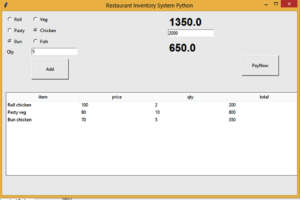
The Restaurant Point of sales System is developed using python. The project is built to manage items and transactions. To make a new transaction, fields such as: Item and ingredients , qty and payment needs to be selected. If you like to learn point of sales systems step by step, this is the right place to learn from the beginning.
from tkinter import *
from tkinter import ttk

def pay():
    totall = float(tot.cget("text"))
    pay = float(e11.get())
    bal = pay - totall
    balText.set(bal)


def selection():
    selection =   radio.get()
    selection1 =  radio1.get()
    qty = int(e1.get())
    if(selection==1):
     if(selection1 ==1):
        item = "Roll"
        inge = "veg"
        price = 50
        tot = int(price * qty)
        tempList = [[item + " " + inge , price, qty, tot]]
        tempList.sort(key=lambda e: e[1], reverse=True)
        for i, (item, price, qty, tot) in enumerate(tempList, start=1):
              listBox.insert("", "end", values=(item, price, qty, tot))

     elif  (selection1 == 2):
         item = "Roll"
         inge = "chicken"
         price = 100
         tot = int(price * qty)
         tempList = [[item + " " + inge, price, qty, tot]]
         tempList.sort(key=lambda e: e[1], reverse=True)
         for i, (item, price, qty, tot) in enumerate(tempList, start=1):
             listBox.insert("", "end", values=(item, price, qty, tot))

     elif (selection1 == 3):
         item = "Roll"
         inge = "Fish"
         price = 80
         tot = int(price * qty)
         tempList = [[item + " " + inge, price, qty, tot]]
         tempList.sort(key=lambda e: e[1], reverse=True)
         for i, (item, price, qty, tot) in enumerate(tempList, start=1):
           listBox.insert("", "end", values=(item, price, qty, tot))


    elif (selection == 2):

     if (selection1 == 1):

        item = "Pasty"

        inge = "veg"

        price = 80

        tot = int(price * qty)

        tempList = [[item + " " + inge, price, qty, tot]]

        tempList.sort(key=lambda e: e[1], reverse=True)

        for i, (item, price, qty, tot) in enumerate(tempList, start=1):
            listBox.insert("", "end", values=(item, price, qty, tot))


     elif (selection1 == 2):

        item = "Pasty"

        inge = "chicken"

        price = 90

        tot = int(price * qty)

        tempList = [[item + " " + inge, price, qty, tot]]

        tempList.sort(key=lambda e: e[1], reverse=True)

        for i, (item, price, qty, tot) in enumerate(tempList, start=1):
            listBox.insert("", "end", values=(item, price, qty, tot))


     elif (selection1 == 3):

        item = "Pasty"

        inge = "Fish"

        price = 120

        tot = int(price * qty)

        tempList = [[item + " " + inge, price, qty, tot]]

        tempList.sort(key=lambda e: e[1], reverse=True)

        for i, (item, price, qty, tot) in enumerate(tempList, start=1):
            listBox.insert("", "end", values=(item, price, qty, tot))

    elif (selection == 3):

     if (selection1 == 1):

        item = "Bun"

        inge = "veg"

        price = 60

        tot = int(price * qty)

        tempList = [[item + " " + inge, price, qty, tot]]

        tempList.sort(key=lambda e: e[1], reverse=True)

        for i, (item, price, qty, tot) in enumerate(tempList, start=1):
            listBox.insert("", "end", values=(item, price, qty, tot))


     elif (selection1 == 2):

        item = "Bun"

        inge = "chicken"

        price = 70

        tot = int(price * qty)

        tempList = [[item + " " + inge, price, qty, tot]]

        tempList.sort(key=lambda e: e[1], reverse=True)

        for i, (item, price, qty, tot) in enumerate(tempList, start=1):
            listBox.insert("", "end", values=(item, price, qty, tot))


     elif (selection1 == 3):

        item = "Bun"

        inge = "Fish"

        price = 40

        tot = int(price * qty)

        tempList = [[item + " " + inge, price, qty, tot]]

        tempList.sort(key=lambda e: e[1], reverse=True)

        for i, (item, price, qty, tot) in enumerate(tempList, start=1):
            listBox.insert("", "end", values=(item, price, qty, tot))

    sum1 = 0.0
    for child in listBox.get_children():
        sum1 += float(listBox.item(child, 'values')[3])
    totText.set(sum1)


top = Tk()
top.geometry("800x500")
top.title("Restaurant Inventory System Python")

radio = IntVar()
radio1 = IntVar()
global totText
global balText
totText = StringVar()
balText = IntVar()
R1 = Radiobutton(top, text="Roll", variable=radio, value=1)
R1.pack(anchor=W)
R1.place(x=10,y=10)

R2 = Radiobutton(top, text="Pasty", variable=radio, value=2)
R2.pack(anchor=W)
R2.place(x=10,y=40)

R3 = Radiobutton(top, text="Bun", variable=radio, value=3)
R3.pack(anchor=W)
R3.place(x=10,y=70)


R4 = Radiobutton(top, text="Veg", variable=radio1, value=1)
R4.pack(anchor=W)
R4.place(x=80,y=10)

R2 = Radiobutton(top, text="Chicken", variable=radio1, value=2)
R2.pack(anchor=W)
R2.place(x=80,y=40)

R3 = Radiobutton(top, text="Fish", variable=radio1, value=3)
R3.pack(anchor=W)
R3.place(x=80,y=70)

e1 = Entry(top)
e1.place(x=80, y=100)
Label(top, text="Qty").place(x=10, y=100)

tot = Label(top, text="",font="arial 22 bold", textvariable=totText)
tot.place(x=450, y=10)

Button(top, text="Add",command = selection,height=3, width= 13).place(x=80, y=130)


e11 = Entry(top)
e11.place(x=450, y=50)

e12 = Entry(top)

balance = Label(top, text="",font="arial 22 bold", textvariable=balText).place(x=450, y=80)
Button(top, text="PayNow",command = pay,height=3, width= 13).place(x=650, y=120)


cols = ('item', 'price', 'qty','total')
listBox = ttk.Treeview(top, columns=cols, show='headings')

for col in cols:
    listBox.heading(col, text=col)
    listBox.grid(row=1, column=0, columnspan=2)
    listBox.place(x=10, y=220)

top.mainloop()