In this tutorials will teach Sales Inventory in Java in step by step. If you interest in learning inventory management system in java this is the right place. where you will learn.
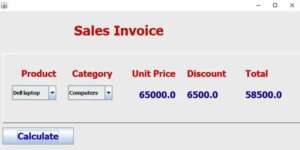
Paste code inside Calculate Button
double price;
        double discount;
        double sum;

        if(CboProduct.getSelectedItem().equals("Dell laptop") && CboCategory.getSelectedItem().equals("Computers"))
        {
            price = 65000;
            discount = price * 10/100;
            sum = price - discount;
            lblUprice.setText(String.valueOf(price));
            lblDis.setText(String.valueOf(discount));
            lblTot.setText(String.valueOf(sum));
        }
         else if(CboProduct.getSelectedItem().equals("Note book") && CboCategory.getSelectedItem().equals("Computers"))
        {
            price = 55000;
            discount = price * 5/100;
            sum = price - discount;

            lblUprice.setText(String.valueOf(price));
            lblDis.setText(String.valueOf(discount));
            lblTot.setText(String.valueOf(sum));
        }
         else if(CboProduct.getSelectedItem().equals("Digital camara") && CboCategory.getSelectedItem().equals("Cameras"))
        {
            price = 45000;
            discount = price * 8/100;
            sum = price - discount;

            lblUprice.setText(String.valueOf(price));
            lblDis.setText(String.valueOf(discount));
            lblTot.setText(String.valueOf(sum));
        }
         else if(CboProduct.getSelectedItem().equals("Pen drive") && CboCategory.getSelectedItem().equals("Electronics"))
        {
            price = 15000;
            discount = price * 3/100;
            sum = price - discount;

            lblUprice.setText(String.valueOf(price));
            lblDis.setText(String.valueOf(discount));
            lblTot.setText(String.valueOf(sum));
        }
         else if(CboProduct.getSelectedItem().equals("Soft set") && CboCategory.getSelectedItem().equals("Furniture"))
        {
            price = 150000;
            discount = price * 25/100;
            sum = price - discount;

            lblUprice.setText(String.valueOf(price));
            lblDis.setText(String.valueOf(discount));
            lblTot.setText(String.valueOf(sum));
        }
        else
         {
             JOptionPane.showMessageDialog(this, "Choose the Right Product");
         }
I have attached the video tutorial below it will help you to do this step by step.