This tutorial will teach you how to search using python Gui application connect with mysql.
from tkinter import *
import mysql.connector

def Ok():
    global myresult
    studname = e1.get()
    coursename = e2.get()
    fee = e3.get()

    mysqldb=mysql.connector.connect(host="localhost",user="root",password="",database="smschool")
    mycursor=mysqldb.cursor()

    try:
        mycursor.execute("SELECT * FROM record where id = '" + studname + "'")
        myresult = mycursor.fetchall()

        for x in myresult:
            print(x)
        e2.delete(0, END)
        e2.insert(END, x[2])
        e3.delete(0, END)
        e3.insert(END, x[3])

    except Exception as e:
       print(e)
       mysqldb.rollback()
       mysqldb.close()

root = Tk()
root.title("Search Mysql")
root.geometry("300x200")

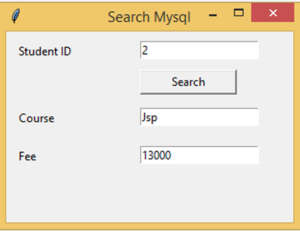
Label(root, text="Student ID").place(x=10, y=10)
Button(root, text="Search", command=Ok ,height = 1, width = 13).place(x=140, y=40)
Label(root, text="Course").place(x=10, y=80)
Label(root, text="Fee").place(x=10, y=120)

e1 = Entry(root)
e1.place(x=140, y=10)

e2 = Entry(root)
e2.place(x=140, y=80)

e3 = Entry(root)
e3.place(x=140, y=120)

root.mainloop()