In this tutorials will teach Student Marks Calculation System in JavaScript step by step.Input Student Name, Marks and Calculate the Total,avg,grade.when you calculate the grade you have to follow the Following Conditions.
If the avg is greater than 50 grade will be pass
Other wise grade will be fail.
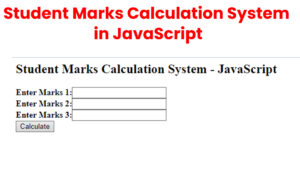
Create the page index.html
index.html
<script language="JavaScript">
var a;//Global variable
var b;
var c;
var result=0; //Global variable
var avg=0; //Global variable

function Calculate()
{
 a=parseInt(form1.txtNum1.value);
 b=parseInt(form1.txtNum2.value);
 c=parseInt(form1.txtNum3.value);
 result=a+b+c;
 avg = result/3;

document.write("The Total is  :"+ "<b>" + result  +  "<b>" + "</br>");

document.write("The Avg is  :"+ "<b>" + avg  +  "<b>" + "</br>");

if(avg > 50)
{
    document.write("The Grade is  :"+ "<b>" + "Pass"  +  "<b>" );

}
else
{
    document.write("The Grade is  :"+ "<b>" + "Fail"  +  "<b>" );
}
}
</script>

<html>
<head></head>
<body>
    <h2>Student Marks Calculation System - JavaScript</h2>
<form name="form1">
<b>Enter Marks 1:</b><INPUT type="textbox" name="txtNum1"> </br>
<b>Enter Marks 2:</b><INPUT type="textbox" name="txtNum2"> </br>
<b>Enter Marks 3:</b><INPUT type="textbox" name="txtNum3"> </br>

<INPUT type="button" Value="Calculate" onClick='Calculate()'>
</form>
</body>
</html>
I have attached the video tutorial below it will help you to do this step by step.