This tutorial will teach you Student Marks Calculation System Using python tkinter is used to create a graphical user interface in python.In order to calculating the grade using following conditions.if you are interested to learn python tkinter tutorial this is the right place where you learn.
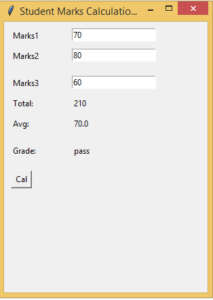
Input student marks to calculating the total,grade. the grade is awared as “Pass” when the average is more than 50.otherwise grade is fail.
from tkinter import *

def Ok():
    result = int(e1.get()) + int(e2.get()) + int(e3.get())

    totText.set(result)

    average = result/3
    avgText.set(average)

    if (average > 50):
        grade = "pass"
    else:
        grade = "fail"

    gradeText.set(grade)

root = Tk()
root.title("Student Marks Calculation System")
root.geometry("300x400")

global e1
global e2
global e3
global totText
global avgText
global gradeText

totText = StringVar()
avgText = StringVar()
gradeText = StringVar()

Label(root, text="Marks1").place(x=10, y=10)
Label(root, text="Marks2").place(x=10, y=40)
Label(root, text="Marks3").place(x=10, y=80)
Label(root, text="Total:").place(x=10, y=110)
Label(root, text="Avg:").place(x=10, y=140)
Label(root, text="Grade:").place(x=10, y=180)

e1 = Entry(root)
e1.place(x=100, y=10)

e2 = Entry(root)
e2.place(x=100, y=40)

e3 = Entry(root)
e3.place(x=100, y=80)

result = Label(root, text="", textvariable=totText).place(x=100, y=110)
avg = Label(root, text="", textvariable=avgText).place(x=100, y=140)
grade = Label(root, text="", textvariable=gradeText).place(x=100, y=180)

Button(root, text="Cal", command=Ok ,height = 1, width = 3).place(x=10, y=220)

marks1 = Entry(root)
marks2 = Entry(root)
marks3 = Entry(root)
root.mainloop()