
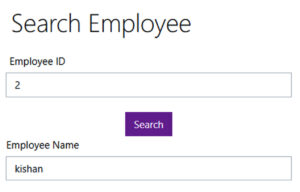
This tutorial will teach how to make a search criteria using Spring boot Application. In this tutorial explain simple example of search. Enter the Employee Id on the input field click search button relevant employee name will be displayed on the below input filed.
Domain
First you must Create the package com.example.SearchEmployee.domain inside the package you have to create the class.
Employee.java
@Entity
public class Employee {

	@Id
    @GeneratedValue(strategy= GenerationType.IDENTITY)
    private Long id;
    private String ename;
    private int mobile;
    private int salary;

    public Employee() {

	}
	public Employee(Long id, String ename, int mobile, int salary) {

		this.id = id;
		this.ename = ename;
		this.mobile = mobile;
		this.salary = salary;
	}


	public Long getId() {
		return id;
	}
	public void setId(Long id) {
		this.id = id;
	}
	public String getEname() {
		return ename;
	}
	public void setEname(String ename) {
		this.ename = ename;
	}
	public int getMobile() {
		return mobile;
	}
	public void setMobile(int mobile) {
		this.mobile = mobile;
	}
	public int getSalary() {
		return salary;
	}
	public void setSalary(int salary) {
		this.salary = salary;
	}

	@Override
	public String toString() {
		return "Employee [id=" + id + ", ename=" + ename + ", mobile=" + mobile + ", salary=" + salary + "]";
	}
}
after that you have to Create the package com.example.SearchEmployee.Controller . inside the package you have to create the class
EmployeeController .java
@Controller
public class EmployeeContoller {

    @Autowired
    private EmployeeService service;

    @GetMapping("/")
    public String add(Model model) {
    	List<Employee> listemployee = service.listAll();
        model.addAttribute("employee", new Employee());
        return "index";
    }


    @PostMapping("/search")
     public String doSearchEmployee(@ModelAttribute("employeeSearchFormData") Employee formData, Model model) {
            Employee emp = service.get(formData.getId());
            model.addAttribute("employee", emp);
            return "index";
     }

}
First you must Create the package com.example.SearchEmployee.Service . inside the package you have to create the class
EmployeeService.java
@Service
public class EmployeeService {


	@Autowired
    private EmployeeRepository repo;

	public List<Employee> listAll() {
        return repo.findAll();
    }


    public Employee get(long id) {
        return repo.findById(id).get();
    }

}
First you must Create the package com.example.SearchEmployee.Repository inside the package you have to create the Interface here.
EmployeeRepository.java
@Repository
public interface EmployeeRepository extends JpaRepository<Employee, Long>{

}
After that you must set database path and project configuration in application.properties file.
spring.datasource.url=jdbc:mysql://localhost:3306/gcompany?useUnicode=true&useJDBCCompliantTimezoneShift=true&useLegacyDatetimeCode=false&serverTimezone=UTC
server.error.whitelabel.enabled=false
server.port=8020
spring.datasource.username=root
spring.datasource.password=

spring.jpa.open-in-view=false
spring.thymeleaf.cache=false
Inside the Templete Folder Create the page index.
index.html
<!DOCTYPE html>
<html>
<head>
<meta charset="ISO-8859-1">
<title>Insert title here</title>

   <link rel="stylesheet" href="https://stackpath.bootstrapcdn.com/bootswatch/4.5.2/cosmo/bootstrap.min.css" />
   <script src= "https://stackpath.bootstrapcdn.com/bootstrap/4.5.2/js/bootstrap.min.js" ></script>

</head>
<body>
<div align="center">

    <h1>Search Employee</h1>
    <br />
     <div class="col-sm-4">

	<form action="#" th:action="@{/search}" th:object="${employee}" method="post">
        <div alight="left">
            <tr>
                <label class="form-label" >Employee ID</label>
                <td>
                    <input type="text" th:field="*{id}" class="form-control" placeholder="Employee ID" />
                </td>
            </tr>
        </div>

            <br>
            <tr>
            <td colspan="2"><button type="submit" class="btn btn-info">Search</button> </td>
            </tr>


            <div alight="left">
            <tr>
                <label class="form-label" >Employee Name</label>
                <td>
                    <input type="text" th:field="${employee.ename}" class="form-control" placeholder="Employee Name" />
                </td>
            </tr>
         </div>
    </form>
</div>
</body>
</html>
i have attached the video link below. which will do this tutorials step by step.