This tutorial will teach you how to make the Search Records using C#.net step by step.
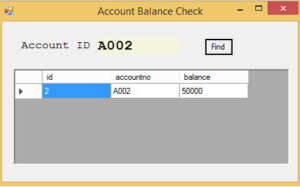
if you enter the Account id on the textbox relavent matching record will be displayed on the datagridview.
Establish the database connection
SqlConnection con = new SqlConnection("server=.;database=Bank; integrated security=true;");
Paste the code inside the find button
 SqlDataAdapter sh_adapter9;
 DataSet sh_dataset19;
 DataTable sh_table9;


            sh_adapter9 = new SqlDataAdapter("select * from account where accountno=@p1", con);
            sh_adapter9.SelectCommand.Parameters.Add(new SqlParameter("@p1", SqlDbType.Char, 20));

            sh_adapter9.SelectCommand.Parameters["@p1"].Value = T_11.Text;

            sh_dataset19 = new DataSet();
            sh_dataset19.Tables.GetEnumerator();


            sh_adapter9.Fill(sh_dataset19, "f");
             sh_table9 = sh_dataset19.Tables["f"];

        if (sh_table9.Rows.Count == 0)
        {
            MessageBox.Show("Record Not Found");
        }


        dataGridView1.DataSource = sh_dataset19;
        dataGridView1.DataMember = "f";

        }
    }
I have attached the video tutorial below it will help you to do this step by step.