The Inventory system is developed by Python GUI. The project is built to manage sales and transactions. To make a new transaction, fields such as: short eats and Drink type, qty needs to be selected. If you like to learn Inventory system system step by step, this is the right place to learn from the beginning. In this tutorial useful for making a Inventory system system for a small shops.
i used pycharm editor to writing the code
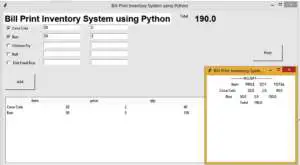
Full code of Project
from tkinter import *
from tkinter import ttk

def print():
    tott = float(totText.get())
    top = Toplevel()
    top.geometry("300x300")
    top.config(bg="white")
    l = Label(top, text='---------RECIEPT----------')
    l.pack()
    l.config(bg="white")
    heading = Label(top, text='\tItem\tPRICE\tQTY\tTOTAL')
    heading.pack()
    heading.config(bg="white")

    for child in listBox.get_children():
        item = (listBox.item(child, 'values')[0])
        price = float(listBox.item(child, 'values')[1])
        qty = float(listBox.item(child, 'values')[2])
        tot = float(listBox.item(child, 'values')[3])
        item1 = Label(top, text=f'{item}\t{price}\t{qty}\t{tot}')
        item1.config(bg="white")
        item1.pack()

    tot = Label(top, text=f'Total\t{tott}')
    tot.config(bg="white")
    tot.pack()


def show():
    tot = 0
    if (var1.get()):
        price = int(e1.get())
        qty = int(e6.get())
        tot = int(price * qty)
        tempList = [['Coca Cola', e1.get(), e6.get(), tot]]
        tempList.sort(key=lambda e: e[1], reverse=True)
        for i, (item, price, qty, tot) in enumerate(tempList, start=1):
            listBox.insert("", "end", values=(item, price, qty, tot))

    if (var2.get()):
        price = int(e2.get())
        qty = int(e7.get())
        tot = int(price * qty)
        tempList = [['Bun', e2.get(), e7.get(), tot]]
        tempList.sort(key=lambda e: e[1], reverse=True)
        for i, (item, price, qty, tot) in enumerate(tempList, start=1):
            listBox.insert("", "end", values=(item, price, qty, tot))

    if (var3.get()):
        price = int(e3.get())
        qty = int(e8.get())
        tot = int(price * qty)
        tempList = [['Chicken Fry', e3.get(), e8.get(), tot]]
        tempList.sort(key=lambda e: e[1], reverse=True)
        for i, (item, price, qty, tot) in enumerate(tempList, start=1):
            listBox.insert("", "end", values=(item, price, qty, tot))

    if (var4.get()):
        price = int(e4.get())
        qty = int(e9.get())
        tot = int(price * qty)
        tempList = [['Roll', e4.get(), e9.get(), tot]]
        tempList.sort(key=lambda e: e[1], reverse=True)

        for i, (item, price, qty, tot) in enumerate(tempList, start=1):
            listBox.insert("", "end", values=(item, price, qty, tot))

    if (var5.get()):
        price = int(e5.get())
        qty = int(e10.get())
        tot = int(price * qty)
        tempList = [['Fish Fried Rice', e5.get(), e10.get(), tot]]
        tempList.sort(key=lambda e: e[1], reverse=True)
        for i, (item, price, qty, tot) in enumerate(tempList, start=1):
            listBox.insert("", "end", values=(item, price, qty, tot))

    sum1 = 0.0
    for child in listBox.get_children():
        sum1 += float(listBox.item(child, 'values')[3])
    totText.set(sum1)


root = Tk()
root.title("Bill Print Inventory System using Python")
root.geometry("1000x600")
global e1
global e2
global e3
global e4
global totText
global balText

totText = StringVar()
balText = IntVar()

Label(root, text="Bill Print Inventory System using Python", font="arial 22 bold" ,bg="white").place(x=5, y=10)


var1 = IntVar()
Checkbutton(root, text="Coca Cola", variable=var1).place(x=10, y=50)

var2 = IntVar()
Checkbutton(root, text="Bun", variable=var2).place(x=10, y=80)

var3 = IntVar()
Checkbutton(root, text="Chicken Fry", variable=var3).place(x=10, y=110)

var4 = IntVar()
Checkbutton(root, text="Roll", variable=var4).place(x=10, y=140)

var5 = IntVar()
Checkbutton(root, text=" Fish Fried Rice  ", variable=var5).place(x=10, y=170)
Label(root, text="Total").place(x=600, y=10)

e1 = Entry(root)
e1.place(x=140, y=50)

e2 = Entry(root)
e2.place(x=140, y=80)

e3 = Entry(root)
e3.place(x=140, y=110)

e4 = Entry(root)
e4.place(x=140, y=140)

e5 = Entry(root)
e5.place(x=140, y=170)

e6 = Entry(root)
e6.place(x=300, y=50)

e7 = Entry(root)
e7.place(x=300, y=80)

e8 = Entry(root)
e8.place(x=300, y=110)

e9 = Entry(root)
e9.place(x=300, y=140)

e10 = Entry(root)
e10.place(x=300, y=170)

tot = Label(root, text="", font="arial 22 bold", textvariable=totText)
tot.place(x=650, y=10)

Button(root, text="Add", command=show, height=3, width=13).place(x=10, y=220)

Button(root, text="Print", command=print, height=3, width=13).place(x=850, y=120)
cols = ('item', 'price', 'qty', 'total')
listBox = ttk.Treeview(root, columns=cols, show='headings')

for col in cols:
    listBox.heading(col, text=col)
    listBox.grid(row=1, column=0, columnspan=2)
    listBox.place(x=10, y=300)


root.mainloop()
I have attached the video tutorial below it will help you to do this step by step.